The main reason for passwords appearing in headlines are large password breaches. What about being able to fearlessly publish scrambled passwords as they are stored on servers and still keep passwords hidden even if they were “123456”, “password”, or “iloveyou”.
We have developed a system that uses a trusted hardware component to “scramble” user passwords. This trusted hardware holds encryption keys that scramble passwords (using SHA1-HMAC) and one needs this hardware to do any password attack. If we use the system for, let’s say, WordPress then instead of calling MD5 function, we call a REST API of our system, e.g.:
pwdValue = readfile("https://scrambler.s-crib.com:4242/SCRAMBLE/george/$receivedPwd/4/salt");
This small difference in the WordPress code (arguably we will need a plugin initially) means that you can publish all scrambled user passwords for anyone to download and no one will be able to find passwords even if they were “password”, “12345678” or “letmein”.
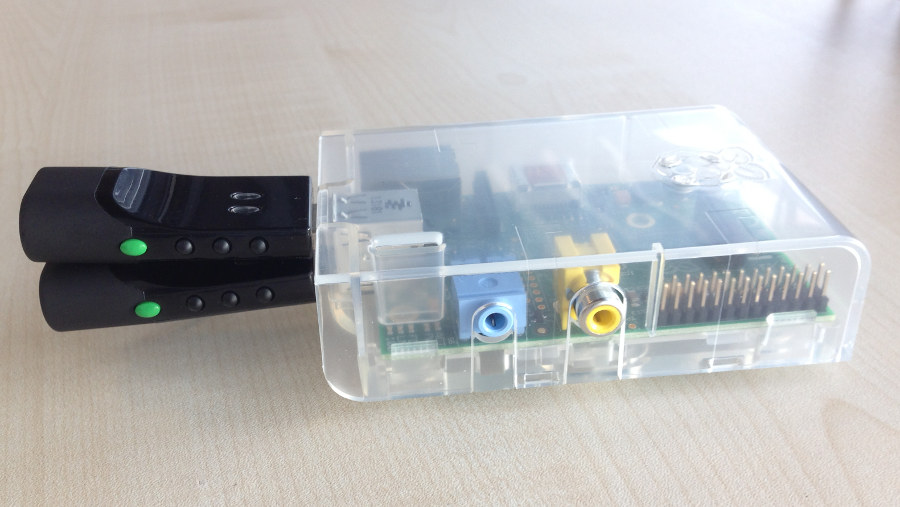 Figure 1: Two S-CRIB Scramblers plugged to Raspberry Pi.
The current implementation uses Raspberry Pi as an “untrusted” host for web service. It is an inexpensive but sufficiently powerful platform for our password scrambling system.
Security
Our way of password scrambling is to compute message authentication code with SHA1-HMAC. This is a one-way cryptographic function with a key. This key is only available inside the trusted hardware device (Scrambler). It is not stored on the server using S-CRIB Scramblers or anywhere else.
As long as the encryption key is kept secret, all passwords are secure, regardless of their own strength. Even if passwords were just one letter, the attacker would not be able to find out from their scrambled values.
Our first implementation used encryption – the idea was to provide more flexibility for administrators. On second thought, we realised that it might be better not to put so much responsibility on administrators and so the product now uses SHA1-HMAC.
The dongle (Scrambler) uses 4 keys / passwords.
- 1 – 10 characters long is used to identify clusters (when more than one dongle is used to boost throughput).
- 2 – this is the actual key for SHA1-HMAC
- 3 – this is used for initialisation vectors.
- 4 – encryption key for remote commands ENSCRAMBLE and ENGETID. This key is shared with the client (WordPress in our case) to provide end-to-end encryption of passwords sent for scrambling.
We tried to implement key generation as secure as possible. We use a microsecond timer in the dongle that measures communication delays between the dongle and its host computer. We do fifty samplings. If you don’t trust it, you can use your own random initialisation key and and set it with the SETINITKEY command. It is our believe that passwords contain sufficient amount of entropy and that comes from two sources:
- A unique hardware key set when a dongle is programmed.
- Random initialisation key that is derived from microsecond timer measuring delays in communication between itself and host PC.
Architecture
The system comprises two elements:
- Hardware dongle – It is attached to a USB port of a host PC. It is a serial device (UART) over USB with a relatively simple management and operational protocol.
- Web service – This simplifies use of hardware dongles and provides unified RESTfull interface that can be used locally or remotely (e.g., when the client system runs in virtualised environment) as the whole solution offers end-to-end encryption of sensitive data.
Performance
The following figures will be improved as we use a vanilla implementation of SHA1.
One hardware dongle (S-CRIB Scrambler) can scramble around 220 330 (updated 8 March) passwords per minute remotely (with end-to-end encryption). Although it does not sound like a big number, it is sufficient throughput for more than 10,000 users. The throughput can be however multiplied by creating clusters of Scrambles that share the load.
We have tested the system with S-CRIB Scrambler connected to a Raspberry Pi in the role of untrusted host. We used the Scrambler(s) via the web service to include latency of the whole application stack. You can see detailed results below.
S-CRIB Scrambler Design
Basics
We use the same hardware as for our Password S-CRIB and only re-implemented the firmware to add required functionality. The keys / passwords now have 32 characters so they can be directly used with AES-256. Each password can give provide up to 199 bits of entropy as we use 76 different characters. The source of passwords is a combination of a “dongle key” (unique for each Scrambler) and a random SHA1 key generated using microsecond timer applied on communication between Scrambler and the host PC.
Multiplying Throughput – Clusters
One can create scrambling clusters by cloning Scramblers. Scramblers can be cloned by replacing the random SHA1 key with a value derived from the cloned dongle. This is only possible during the initialisation phase when management functions can be used. The initialisation phase is closed automatically after the first call of an operational function (e.g. SCRAMBLE).
Scrambler-WS Design
Basics
The Scrambler-WS implements a RESTfull API. Each call returns one text line for easy processing. The SCRAMBLE command would return the following data:
IN: SCRAMBLE mypassword 10

OUT: 49FD12DB38C3278BEAA95C0CCE491BBFD41D8DC9 10 11le4Ir2LO 0000003F
The first item is a SHA1-HMAC of the password – 40 hexadecimal characters encoding 160 bits if the SHA1-HMAC value. It is followed by the length and the actual salt value. The last value is an operation counter from the dongle.
The call may include an existing salt value, if it is not present a random value is generated. Password salt generated by S-CRIB Scramblers contains lower and upper-case letters and digits. The maximum length is 16 characters.
Remote Use
If you want to use Scrambler(s) remotely – e.g., from an application running in virtual machine, you can use encrypted version of the SCRAMBLE command – ENSCRAMBLE. The parameters are then encrypted into one 64 byte long block that is sent directly to a dongle. Your S-CRIB Scrambler will decrypt it, compute scrambled value of the password and create another 64 byte long block with the result. Encryption is done with on of the keys/passwords generated by the dongle. Request and response are linked with a counter or timestamp sent by the application in the request – it can be up to 10 characters long.
Testing Site
You can test the service at:
http://scrambler.s-crib.com:4242https://scrambler.s-crib.com:4242- http://scrambler.s-crib.com:4243
A detailed API description is here but here are basic commands you can directly test by copying them to your browser’s address box.
- http://scrambler.s-crib.com:4243/SCRAMBLE/george/yourpassword/10
- https://scrambler.s-crib.com:4242/SCRAMBLE/george/mypassword/10
- https://scrambler.s-crib.com:4242/GETID/george/0
- http://scrambler.s-crib.com:4243/GETCLUSTERID/george
We have removed some internal checks so that you can test all commands remotely. As you can see, there is an API key “george” and the dongle’s ID is 0.
You need to encrypt data to call ENSCRAMBLE. Python code for testing is at Github – here.
Configuration
The testing site uses default parameters. It cancels requests after 5 seconds in processing queue and there is also a limit on the number of WSGI threads. The site also has limit of 20 TCP connections.
Current Implementation
S-CRIB Scramblers use the form factor or small hardware dongles that we manufacture.
Scrambler-WS is implemented with internal queues to maximise flexibility and throughput of the system.
We can provide image for SD-card for Raspberry Pi that we suggest to use as an untrusted host if one is required. This means that you can just simply copy the image to a new SD-card and start using the system once you plug it to a network.
Details of Load Testing
We did load testing using a Scramble connected to a Raspberry Pi. The test client was connecting from a residential broadband connection (20Mbps). The test client started a number of threads to simulate concurrent requests.
Note: results have been updated on 8th March after removing unnecessary delays in communication between the web service and scramblers.
TEST 1 – 5 client threads
- average latency
1.38s0.9s per request - throughput –
3.6TPS5.5TPS
TEST 2 – 10 client threads
- average latency
2.7s1.76s per request - throughput –
3.7 TPS5.6TPS
TEST 3 – 20 client threads
- average latency
5.4s3.54s per request - throughput –
3.7TPS5.6TPS
TEST 4 – 30 threads
260 TIMEOUTs (in blocks of 10 pretty much…) se requests stayed in processing queues for more than 5 seconds (a configuration parameter). No timeouts after communication delays have been removed.
- average latency
6.4s5.32s per request - throughput –
3.8TPS5.6TPS
We also looked and memory and processor load on the Raspberry Pi
NO TRAFFIC

 3.5 MiB + 654.0 KiB =   4.2 MiB       scribTCP.py    -- queuing and hardware management

 4.9 MiB + 786.5 KiB =   5.6 MiB       scribREST.py   -- RESTfull API - very light server

 6.3 MiB + 831.5 KiB =   7.1 MiB       python2.7
30 THREADS RUNNING AGAINST THE BOX

 3.9 MiB + 682.0 KiB =   4.6 MiB       scribTCP.py   -- queuing and hardware management

 4.9 MiB + 791.5 KiB =   5.6 MiB       scribREST.py  -- RESTfull API - very light server

 6.3 MiB + 830.5 KiB =   7.1 MiB       python2.7
The CPU under load was utilised at about 30-40% while my processes took about 30% of that (in user space). Having said that the overall load peaked around 1.0.
The Python code for Scrambler-WS is at Github.
We are looking for feedback so if you’re interested in testing the system or deploy it, get in touch (dan@s-crib.com)